Lead tracking & analytics

Lead trackingand analyticsthat show whatturned into money.

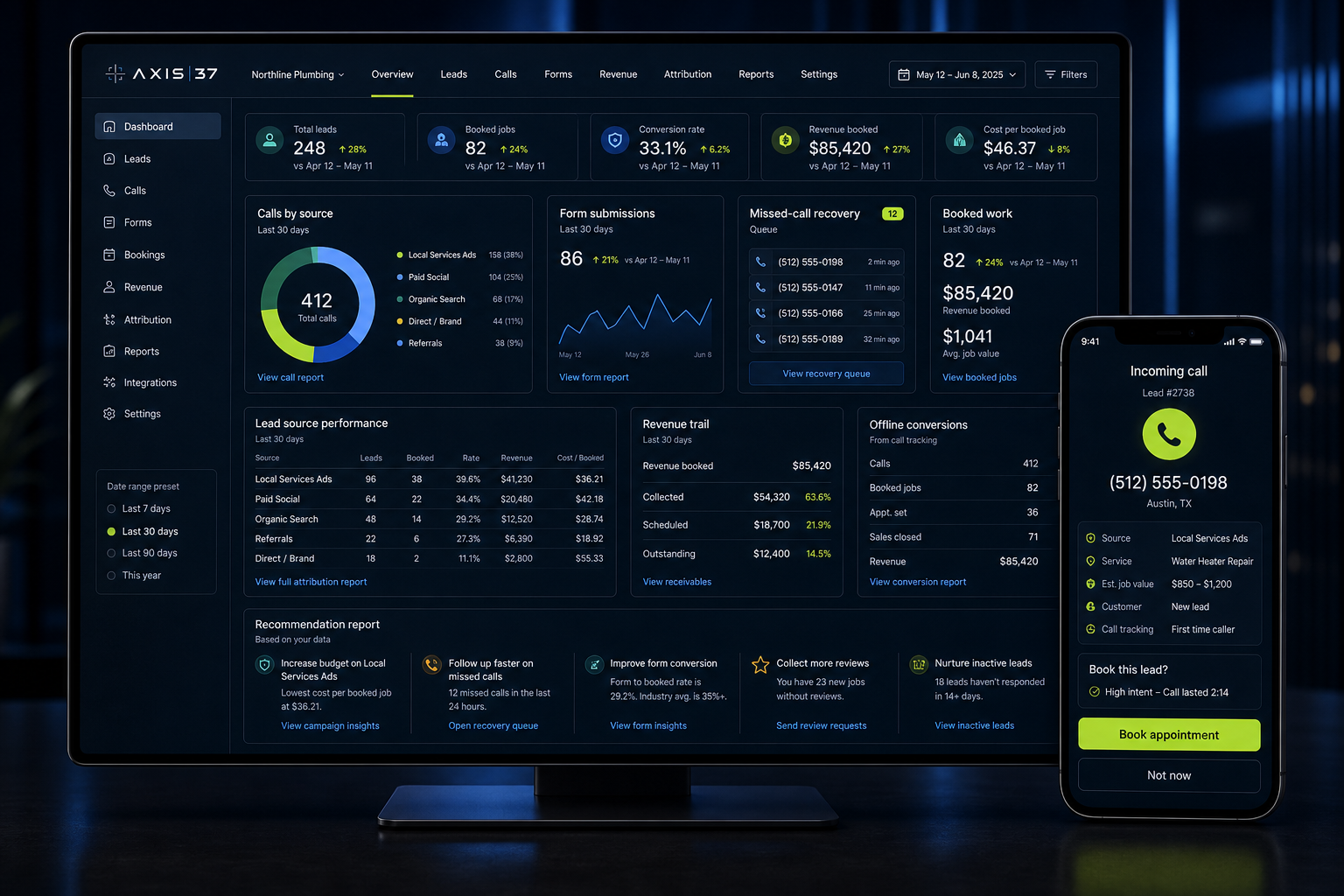
Calls. Forms. Lead source. Revenue trail.

Traffic and calls do not pay the bills. Booked work and collected revenue do.

The hook

If the money trail is broken, the next marketing decision is guesswork.

Traffic, rankings, clicks, calls, and forms do not pay the bills. Booked work and collected revenue do. Axis37 tracks calls, forms, lead sources, missed calls, bookings, and revenue where the trail is available so the next marketing decision is based on what actually happened.

CallsSource and page
FormsContext captured
Lead sourceNo guessing
Missed callsDemand leaks
Revenue trailWhere data allows
Quick answer

What is lead tracking and analytics?

Lead tracking and analytics connect marketing sources to the outcomes they create.

Lead tracking and analytics connect marketing sources to the outcomes they create. For local operators, that means tracking which page, profile, campaign, ad, search query, or AI mention produced the call, form, booking, case, reservation, or invoice. Axis37 uses this data to show which marketing dollars created qualified opportunities, booked work, and revenue where the data supports it.

What matters

Reports should explain the money, not decorate the month.

Analytics only matter if they connect activity to qualified leads, booked work, and revenue where possible. Otherwise the report gets cleaner while the next budget decision stays guesswork.

Conversion phase

The report should connect spend to qualified action.

Calls, forms, bookings, missed calls, and revenue data need a source trail before the next dollar gets assigned.

  • Calls
  • Forms
  • Lead source
  • Missed calls
  • Revenue trail
SignalWeak patternOperating pattern
CallsOne number everywherePage and source-level call tracking
FormsSubmissions with no sourceForms tied to page, channel, campaign, and service
Lead sourceThe team asks how they heard about youSource captured before the call or form is handled
Missed callsLost demand stays invisibleMissed calls, response time, and callback rhythm reviewed
Lead qualityEvery lead counted equallyQualified, weak-fit, spam, missed, and booked leads separated
Revenue trailMarketing stops at lead countBooked work and revenue connected where data allows
Service guide

How lead tracking turns reporting into decisions.

The point is not cleaner dashboards. The point is whether SEO, GBP, paid social, LSAs, websites, or content should change next month.

01

Track the call before the report starts.

Call tracking is the anchor. Separate numbers by page, GBP, ad source, campaign, or key channel where needed.

One number everywhere tells the operator that the phone rang. It does not show which page, profile, campaign, or source created the call.

02

Treat forms and bookings like leads, not inbox noise.

Forms, consultations, reservations, applications, and booking requests need source, page, campaign, and service context.

If the form arrives without source context, the report loses the trail before the sales or intake process even begins.

  • Call tracking.
  • Form tracking.
  • Booking attribution.
  • Campaign source.
  • Offline conversion tracking.
03

Separate lead volume from lead quality.

A channel can produce a lot of weak leads. The Report should separate qualified opportunities, wrong-fit leads, spam, missed calls, and booked work.

That is where analytics starts helping the operator. Lead count is not the same as money.

04

Connect the source to booked work.

Where CRM, booking, case intake, reservation, POS, or invoicing data allows it, the system should connect source to booked work and revenue.

When that data is messy, Axis37 starts with qualified opportunities and booked work, then tightens the handoff until the money trail is clearer.

05

Recover missed demand.

Missed calls are often invisible revenue leaks. Track missed calls, response time, callback rhythm, and after-hours patterns.

If the marketing created demand and the phone was not answered, the report should show the leak.

06

Use analytics to decide the next move.

The point is not a prettier dashboard. The point is whether budget, content, SEO, GBP, paid social, LSAs, or website work should change next month.

The Recommendation Report names the move instead of leaving the operator with another pile of metrics.

Recommendation Report

The Report should name what changed and what moves next.

Lead tracking is the data layer underneath the monthly Recommendation Report. It shows whether visibility became calls, whether calls became booked work, and whether revenue can be tied back to the source.

See a Sample Recommendation Report
01Source

Which page, profile, campaign, ad, search query, or AI mention created the lead.

02Quality

Which leads were qualified, weak-fit, spam, missed, or booked.

03Money trail

Which work and revenue can be connected where the data supports it.

The offer

Analytics only matter when they change the next move.

Axis37 builds lead tracking and analytics into the operating system: call tracking, form tracking, source attribution, missed-call review, lead quality, booked-work visibility, offline conversion tracking, and Recommendation Report guidance. The goal is to see which marketing dollars created qualified opportunities, booked work, and revenue where the trail is available.

01Page-level call tracking across service pages, profiles, ads, and key sources.
02Form, booking, reservation, application, and case inquiry attribution.
03Lead source and campaign tracking tied to action paths.
04Missed-call review, callback rhythm, and response-time visibility.
05Lead quality separated from raw lead volume.
06Revenue trail connected where CRM, booking, POS, or invoice data allows it.
07Monthly Recommendation Report showing what changes next.
Process

How the money trail gets built.

Lead tracking runs as a Conversion cycle: source capture, call tracking, lead quality, booked-work visibility, and monthly guidance.

01

Audit the trail

Review current analytics, call tracking, forms, booking paths, source data, missed calls, and reporting gaps.

02

Map sources

Connect pages, profiles, campaigns, ads, AI mentions, and sources to the actions they should produce.

03

Install tracking

Set up call tracking, form tracking, campaign parameters, offline conversion tracking, and reporting inputs.

04

Classify quality

Separate qualified opportunities, weak-fit leads, spam, missed calls, and booked work.

05

Connect work

Tie leads to bookings, cases, reservations, invoices, and revenue where the data allows it.

06

Report the move

Use the Recommendation Report to decide what gets tightened, expanded, paused, or rebuilt.

FAQs

Questions that come up before tracking gets rebuilt.

What is lead tracking?

Lead tracking connects calls, forms, bookings, cases, reservations, and applications back to the page, profile, campaign, ad, or source that created them.

Is this different from call tracking?

Yes. Call tracking is one core layer. Lead tracking and analytics also cover forms, bookings, missed calls, source attribution, lead quality, offline conversion tracking, and revenue trail visibility where possible.

Can you track revenue?

Yes, when the data supports it. If CRM, booking, POS, case intake, or invoicing data is clean enough, the trail can connect source to revenue. If it is not clean yet, Axis37 starts with qualified opportunities and booked work while the handoff improves.

What if our CRM is messy?

Then the first job is to map what can be trusted. Clean source capture, call tracking, form tracking, booking status, and simple lead-quality categories usually create better visibility before a full CRM cleanup is finished.

Do we need call tracking numbers on every page?

No. Tracking should match decision value. High-intent service pages, ad campaigns, GBP, LSAs, paid social, and major sources usually deserve clearer tracking than low-value pages.

Can this track Google Business Profile, LSAs, and paid social?

Yes. GBP actions, Local Services Ads leads, paid social campaigns, search campaigns, organic pages, and referral sources can all be tracked when the setup and source data are structured correctly.

How does this connect to the Recommendation Report?

The Recommendation Report uses lead tracking and analytics to show which sources created qualified opportunities, booked work, and revenue where available, then names the next move.
Search Checkup

Find the broken money trail before the next report hides it.

The Search Checkup reviews call tracking, forms, lead sources, missed calls, booked-work visibility, and the revenue data needed to make the next marketing decision with less guesswork.

Get My Search Checkup

Your details open a pre-filled email to hello@axis37.com.